In their comments to a recent post that I made, asking people to share their torrenting ratios, some folks were talking about how they have setup media servers for their parents. This sounded really cool and I would like to do the same thing for my family.
I simply mount my torrenting drives with sshfs and consume media with mpv, because I don’t need anything else. But for my technologically less inclined family members, I guess setting up something with a GUI would be kind and nice.
I am torrenting on a VPN router, behind which there is a switch that only switches a specific port - which I rotate regularly for safety - to a public facing router, so that I can ssh into my home network.
Questions:
- I have no experience with or knowledge of these to me fancy sounding GUI projects. For instance, do my family members create accounts that I then approve? Do I need to install and setup something on their endpoints (for instance, to configure which port to use, etc.) or is it simple enough for the layperson to do this themselves?
- Will the fancy stuff accept and be accessible with port forwarding from my public facing router to my VPN router and then into my torrenting rig just like my ssh server does or am I going to have to set this up directly connected to the public facing router?
Please give me your most straightforward recommendations! 🥰
I actually just made a little diagram for myself to help with troubleshooting. Hopefully it’s helpful for others wanting to automate their movie/show accumulation. I made it a little simpler than the original by taking out the music part of it (lmk if I should share the full thing).
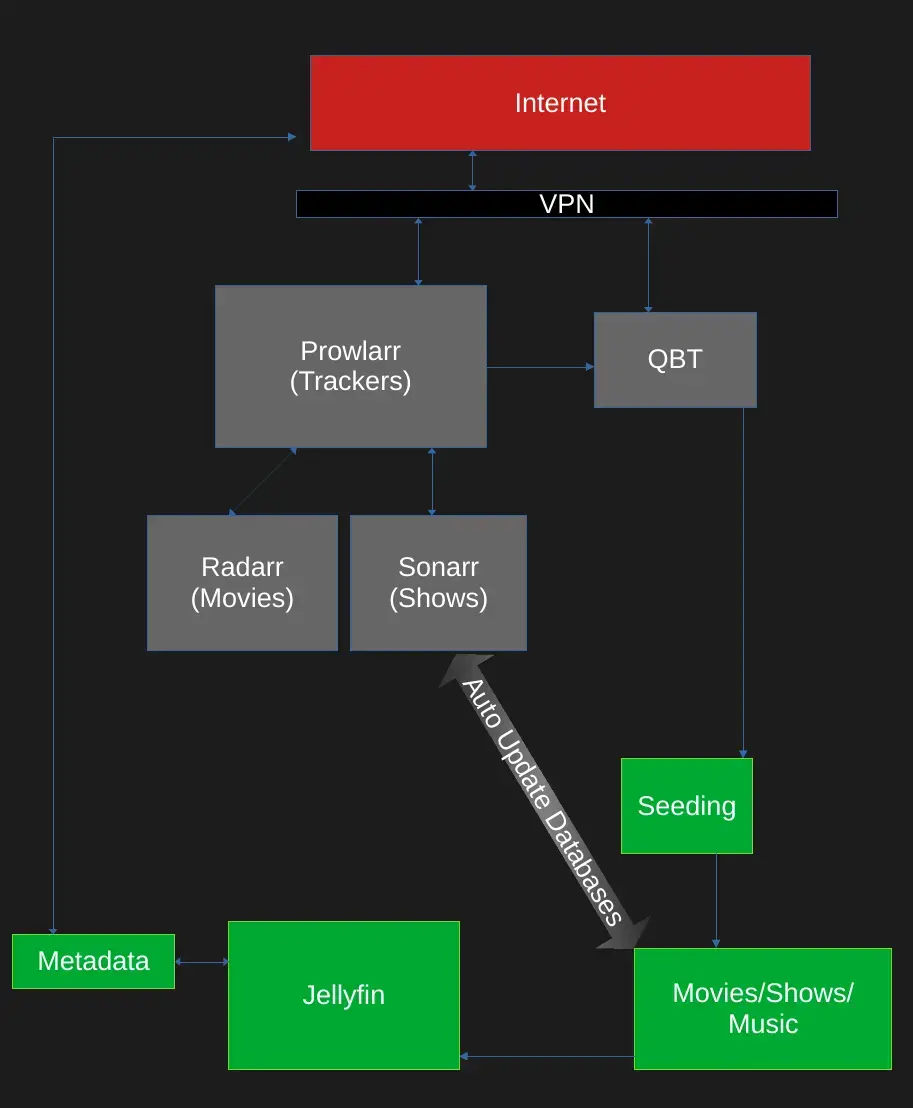
For context, the green boxes are the main server, the grey boxes are running on a Raspberry Pi that’s behind an always-on VPN (Mullvad). You search for movies/shows with Sonarr/Radarr, which browses torrent trackers with Prowlarr, and sends the torrent to QBittorrent. QBT then moves downloaded files to the Seeding directory, where they’re automatically copied into the media directory. Jellyfin then automatically scans for new content and fetches Metadata to make it look pretty.
Your family wouldn’t need to do any fancy port stuff, you’d just need to create accounts on your Jellyfin server and have them log in. All you’d need to port forward is a port for Jellyfin.
edit: I read over the post again and you could definitely take out the whole automated part with Sonarr/Radarr/Prowlarr and just manually search for torrents and the end experience would be the same for your family, just a little more tedious if you get a lot of requests
That’s a really cool setup! And the diagram too! How did you draw that? XD
Also, a stupid question, since the Jellyfin connection will be going in and out through my public router, unencrypted, won’t media consumption through it look like downloading or the likes? Jellyfin sessions aren’t looked for by the powers that be? XD
Thanks! I used LibreOffice Draw so it was pretty easy to make.
To be honest, it probably would be best to use a VPN to get into your home network to watch the content if you wanna be extra-safe. I kind of just run under the assumption that I can always claim it’s my media since it’s all downloaded on a separate connection. I suppose if I ever get a notice of some sort, I’ll switch over to a VPN, but currently it’s working fine for me to have it ran through a domain and makes it a lot easier for family members to use.
I currently am set up with Jellyfin as the GUI which gives your media library a Netflix-like front end. And I use Tailscale as a VPN to access media off my home network. You can send an invite link to your family to join your Tailscale network, and they create an account there. With Jellyfin, I just have everyone use one main account, but maybe there’s some other benefits to using separate Jellyfin accounts that I’m not aware of. Overall it’s pretty straightforward to setup in my opinion. Both those apps have Apple TV apps, which is important because that’s what my family uses to watch their tv already.
maybe there’s some other benefits to using separate Jellyfin accounts that I’m not aware of
Watch history, parental controls, library access controls, etc.
Parental controls are the biggest reason for me and my use.
Jellyfin + NetBird.
NetBird can be used either as a VPN like tailscale (but FOSS and self-host able) or as a reverse proxy. I have it on a VPS so I don’t have to point any traffic directly to my home network.
Look in the Arr stack and combine it with jellyfin. It is fairly easy to setup with docker.
It’s not fairly easy :/ … Specially if you want something that works flawlessly over time !
Maybe for most IT workers, yes it’s easy… But if you are starting out right with 0 knowledge with docker, networking, VPN, gluetun, multi-arch player (tvOS, android TV, Linux, Android, MacOS, iOS), linux, private tracker, exposing your media securely, arr stack configuration… You name it !
Naaah it’s not fairly easy if you’re just starting out !
Kodi - compiled from source on whatever hardware suits your needs. I use an old laptop (busted screen) with an external HD.
Jellyfin and Plex don’t offer as many features. I used Plex for a long time but ultimately it’s untrustable proprietary trash. And, when I last tried Jellyfin, it doesn’t do games, IPTV, music, youtube, other addons, etc. It also seemed kind of buggy/slow.
(I just use qbittorent for torrenting.)
So my family and friends could reach my Kodi server with their clients? Just open/forward a port?
ideally you’d setup wireguard (or whatever) for them to use so you’re not just opening ports to the entire internet. i use jellyfin and like it a lot, but the real major issue with jellyfin is explaining to your elderly mother how to setup and use wireguard on her smart tv.
how would you do that? wireguard requires opening a port unless you use a middle server where you open the port on that and at that point maybe netbird would be an easier option
Yes, but the wireguard connection is encrypted, as opposed to opening up an unencrypted connection for just Jellyfin or whatever.
i see
you could also open http/s ports and use nginx proxy manager, which encrypts connections using TLS
Yeah, to my shame, I don’t know how to setup those https certificates… :( I also need to study how proxies work. xD
Take a look at Caddy if nginx seems too complicated.
Caddy is designed primarily to act as a reverse proxy, and it can automatically set up your certificates with Let’s Encrypt (as long as you have it listening on ports 80 and 443).
You’d only need to set up a domain pointing to your IP, but you can do that for free and without a permanent IP by using a DDNS (like duckdns)
The jellyfin website has instructions on how to set it up with Caddy. I recommend using the Caddyfile.
Jellyfin
to answer your questions (to the best of my knowledge):
Who creates accounts: You create the accounts and give it to them, simple admin dashboard
How access works: its a web server, you configure listening port, that goes through your public facing router to your vpn router then to your torrenting rig that is hosting jellyfin once you can access it, everyone else with access to thr public facing router can by simply entering the ip:port or domain.
There are also clients for some devices, iOS needs a little work last i heard (a few years ago) Android is good to go TVs it depends, some have some dont They connect the same way through ip:port and then login
Rotating ports might be a pain, as you have to input the server ip:port then login on the client every time that changes, if i were you i would setup nginx/nginx proxy manager or something to keep my ports local and put only nginx at the front.
–
it handles my anime, tv show, movie, and music collection pretty well, I have tens of thousands of songs, thousands of episodes, hundreds of shows.
Now to the issues; most recently playlists (as in i faced the issue yesterday), theyre finicky as fuck if you want to migrate from the instance they were created on to a new one.
Performance, the ui lags (usually when managing watched status or editing large numbers of items) I saw their focus for v12 was performance so that might change
jellyfin mpv shim (if you want to use mpv on desktop) sometimes just stacks everything you click, so you want to seek forward? no, it waits until something then replays all your seek commands
I havent tried Plex nor Emby, but I heard Plex handles remote sharing so you can access your server from outside the home network, but they have an expensive sub/lifetime payment.
Thanks for all the detailed and on-point answers! All right, I won’t rotate ports with Jellyfin. The Jellyfin website discourages from directly opening up ports anyway, encouraging to use a proxy, but I don’t want to be leaving logs…
I don’t quite understand how that nginx solution would work (from lack of experience). Does it mean that I would be opening a domain and port of that nginx server to the public instead of my Jellyfin? And then have the nginx server forward connections to Jellyfin?
Youre welcome. I assume there should be a way to stop nginx logs getting generated, or at least make a script to automatically delete them
I may have misunderstood how you had your ports open, do you have them open locally and accessed through your wireguard private network? if so, and you dont mind having others connect to your wireguard server, then youre good to go.
Nginx explained:
let me clarify what nginx and nginx proxy manager are, nginx is the proxy service, nginx proxy manager is nginx with a web dashboard for configuration
as I understand proxy services, they open ports 80 and 443 i think, which are for http and https respectively
from that you can redirect traffic to any local service nginx has access to
you need to host nginx proxy manager on a server and forward http/s and certificate ports (or maybe just http/s) to the server, the server needs local access to jellyfin
you also need a domain to easily get https encryption with letsencrypt, i recommend duckdns
open port:
client > ip:port > your open router > your vpn router > jellyfin
direct access, no filters, no encryption (unless you make your own certs which you need to trust on each client or have all connections from client to server go through wireguard)
nginx/nginx proxy manager:
(subdomain is how nginx knows where or which local ip:port to send incoming traffic)
client > https://subdomain.domain.duckdns.org/ > public network nginx > local network jellyfin
no direct access, nginx filters, encryption
so only a few open ports, lead to as many local services as you want
Thank you so much, again, for taking the time to explain it all! Meanwhile, I have decided to try out the reverse proxy solution Caddy. If that doesn’t work, I’ll try to set up my own with nginx as per your explanation! :)
no problem
afaik, caddy is similar - at least in principle - to nginx, so use whatever floats your boat