This is not a SFW instance. NSFW communities will be tagged, and efforts will be made to keep SFW communities clean, but proceed at your own comfort level.
This is interesting. However, I am wondering how relevant this analysis really is.
Is the compositor-related power usage relevant relative to typical user applications? And is the increased power usage by Wayland-based systems justified by other improvements?
TBH, I have no idea and should read this up but maybe someone can fill in some context?
I’d say the data is pretty meaningless - at least the stuff presented in the picture and article - as it doesn’t compare X11 and Wayland running the same desktop environment. It’s X11 Xfce or Wayland KDE or Wayland Gnome etc. So who is to say whether it’s actually X11 or Wayland contributing to the differences? Comparing Xfce - a low power desktop by design - with Gnome or KDE is not a fair comparison; Gnome and KDE have way more bells and whistles. It’s interesting that X11 xfce4 under stress uses more power than Wayland KDE under stress, but it may be meaningless.
I’d rather see the figures of X11 xfce4 and Wayland xfce4 but the Wayland version is experimental at present so unlikely to be fair. X11 KDE and Wayland KDE would be a better comparison, but even then it reflects how KDE has developed their Wayland version, not necessarily just how Wayland compares to X11.
In terms of power usage, if that’s the primary concern, then go for the lightest weight desktop and run the least amount of software possible (including services). Switching from X11 to Wayland is not about power consumption, and a 1 Watt difference on a desktop PC that could run anywhere from 100 to 700 Watts isn’t meaningful. Even on a 100W low powered device, I’d question how important a 1W difference is.
1w makes a huge difference when your laptop is only consuming 4. That’s how laptops get 20+ hour battery life. My M1 MacBook uses like 5-8 watts in normal usage. 1 more watt is very noticeable.
The additional threat models Wayland guards against have never, to my knowledge, been seen in the wild (and may never be). So any improvement in security is hypothetical, and there are some tradeoffs in areas like accessibility. It’s fine to make your own decision of which stack to use on the basis of hypothetical security improvements, but saying that X is insecure because it doesn’t protect against something that never happens is dubious.
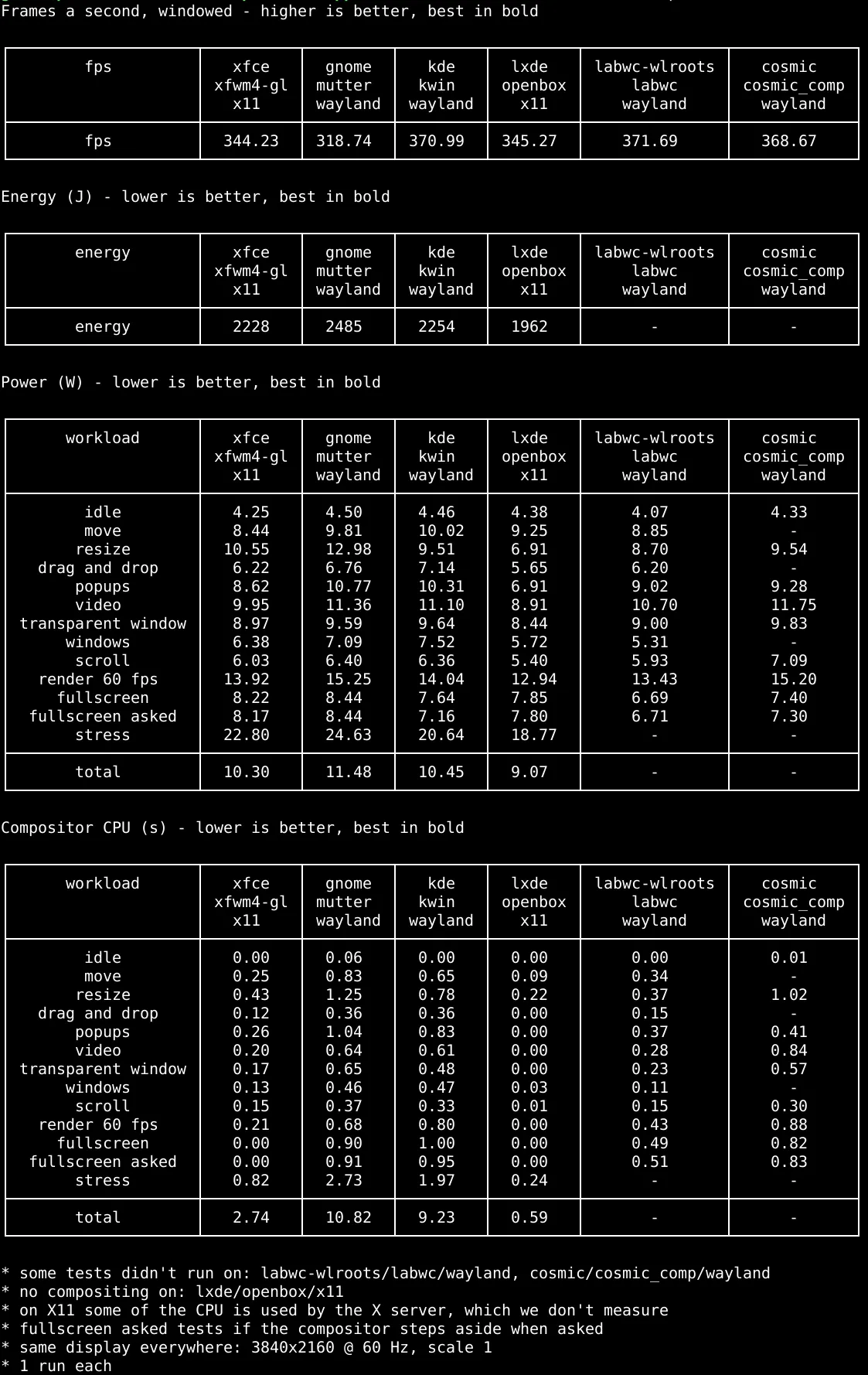
This is interesting. However, I am wondering how relevant this analysis really is. Is the compositor-related power usage relevant relative to typical user applications? And is the increased power usage by Wayland-based systems justified by other improvements?
TBH, I have no idea and should read this up but maybe someone can fill in some context?
I’d say the data is pretty meaningless - at least the stuff presented in the picture and article - as it doesn’t compare X11 and Wayland running the same desktop environment. It’s X11 Xfce or Wayland KDE or Wayland Gnome etc. So who is to say whether it’s actually X11 or Wayland contributing to the differences? Comparing Xfce - a low power desktop by design - with Gnome or KDE is not a fair comparison; Gnome and KDE have way more bells and whistles. It’s interesting that X11 xfce4 under stress uses more power than Wayland KDE under stress, but it may be meaningless.
I’d rather see the figures of X11 xfce4 and Wayland xfce4 but the Wayland version is experimental at present so unlikely to be fair. X11 KDE and Wayland KDE would be a better comparison, but even then it reflects how KDE has developed their Wayland version, not necessarily just how Wayland compares to X11.
In terms of power usage, if that’s the primary concern, then go for the lightest weight desktop and run the least amount of software possible (including services). Switching from X11 to Wayland is not about power consumption, and a 1 Watt difference on a desktop PC that could run anywhere from 100 to 700 Watts isn’t meaningful. Even on a 100W low powered device, I’d question how important a 1W difference is.
1w makes a huge difference when your laptop is only consuming 4. That’s how laptops get 20+ hour battery life. My M1 MacBook uses like 5-8 watts in normal usage. 1 more watt is very noticeable.
X11 is dead. It cannot support a modern, secure desktop environment since it was designed ages ago.
The additional threat models Wayland guards against have never, to my knowledge, been seen in the wild (and may never be). So any improvement in security is hypothetical, and there are some tradeoffs in areas like accessibility. It’s fine to make your own decision of which stack to use on the basis of hypothetical security improvements, but saying that X is insecure because it doesn’t protect against something that never happens is dubious.
At the time when it was designed that was secure. Because the computer was probably in a locked room. And potentially as large as a room itself.